Evidian Logo

Eviden > Products > SafeKit: All-in-One SANless High Availability & Application Clustering Software > SafeKit Smart Console: Your High Availability Cluster in Your Pocket

SafeKit Smart Console: Your High Availability Cluster in Your Pocket

Simplify Cluster Management with the SafeKit Web Console

Smart Console: Intuitive, Mobile, and Error-Free High Availability

Redefine how you manage high availability with a solution built for speed and simplicity. The SafeKit Web Console offers a zero-learning-curve experience, allowing you to configure and control your infrastructure with zero-code requirements.

Whether you are at your desk or on the move, the smartphone-compatible dashboard puts total cluster control at your fingertips. By streamlining the management of mirror and farm modules, the Smart Console eliminates human error and ensures a seamless failover process for your most vital systems.

How does a SafeKit mirror cluster work with the web console?

How to configure a SafeKit Mirror Cluster?
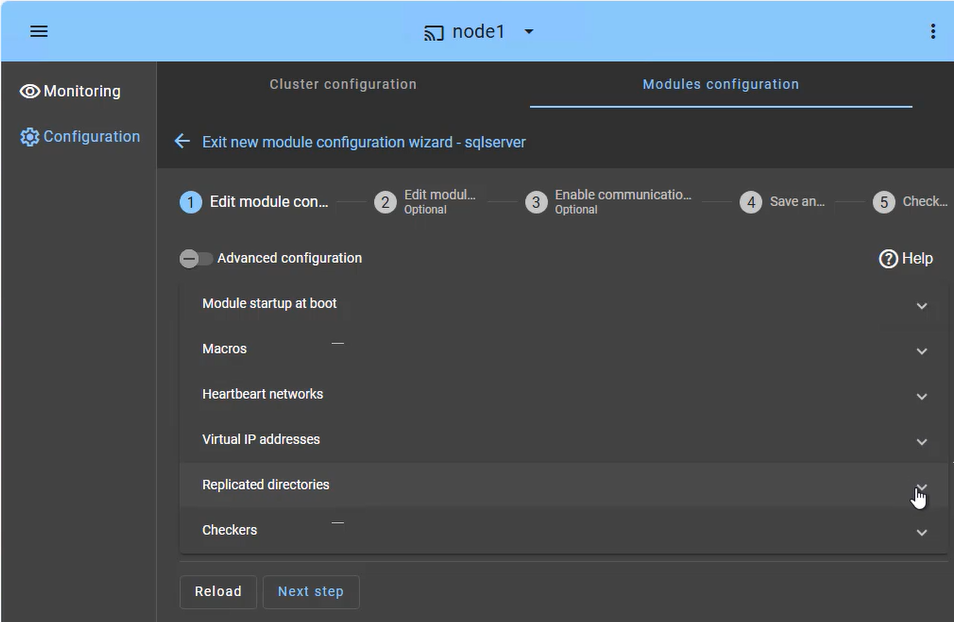
SafeKit Web Console: High Availability configuration dashboard showing heartbeat networks, virtual IP setup, and real-time directory replication for a mirror cluster.

The SafeKit web console provides an intuitive interface to orchestrate high availability for your critical applications. In just a few steps, you can configure a SafeKit mirror cluster to ensure business continuity:

  • Application Failover (Macros Tab): Define the specific application services to be automatically restarted in the event of a failure.
  • Heartbeat network(s): Dedicated communication path(s) used by cluster nodes to continuously monitor each other's health and availability and synchronize failover decisions.
  • Virtual IP Management: Set up the Virtual IP (VIP) for transparent client reconnection after a failover.
  • Real-Time Replication: Select the critical directories for host-based, synchronous byte-level replication.
  • Checkers: Monitor the application's health and trigger automatic recovery if a process failure is detected.

The SafeKit cluster includes a dedicated split-brain checker to resolve network isolation issues without the need for a third witness machine or an additional heartbeat network. Learn more about heartbeat, failover and quorum in a cluster.
How to monitor a SafeKit mirror cluster?

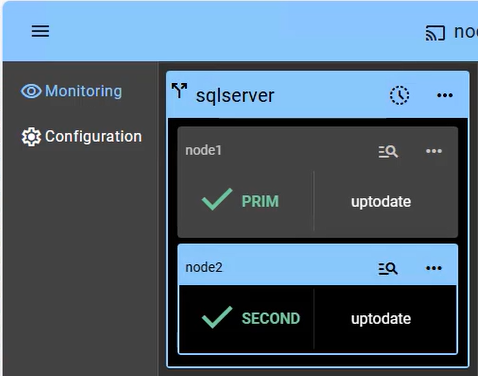
SafeKit Web Console: Real-time monitoring of a 2-node mirror cluster showing PRIM and SECOND states with active data replication.

The SafeKit management console offers a unified view of your high availability infrastructure. It allows administrators to monitor the operational state of the cluster and track data synchronization in real-time.

For a 2-node mirror cluster, the console clearly displays the roles of each server:

  • PRIM (Primary): The active node currently running the application and managing the Virtual IP. It performs writes to the local storage and real-time replication to the secondary node.
  • SECOND (Secondary): The standby node receiving synchronous byte-level updates. It is ready to take over instantly if the Primary fails.
  • ALONE State: Visually alerts you when the cluster is running on a single node (e.g., during maintenance or after a failure), indicating that redundancy is temporarily lost.
  • Resynchronization Progress: When a failed node recovers, its status turns orange during background data reintegration, ensuring no downtime during the "return to normal" phase.

Beyond simple status icons, the interface provides one-click failover orchestration (... menu), allowing you to manually reassign the primary role for planned maintenance while ensuring continuous availability for user activity.

How does a SafeKit farm cluster work with the web console?

How to configure a SafeKit farm cluster?

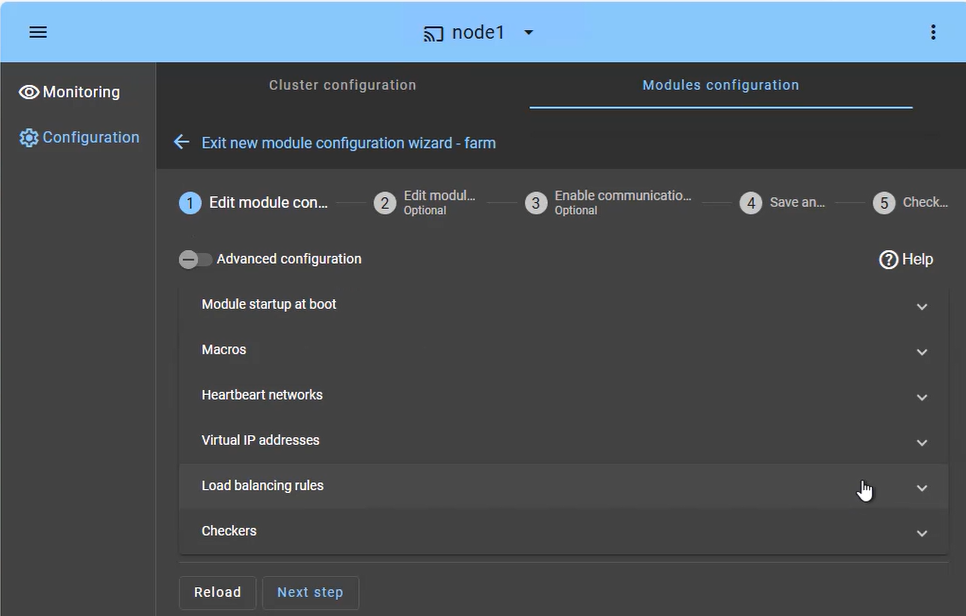
SafeKit Web Console: Farm cluster configuration for network load balancing and virtual IP management.

The SafeKit farm cluster is designed for high availability and scalability of services. The configuration focuses on distributing incoming traffic across both nodes simultaneously:

  • Load Balanced Services (Macros tab): Define the specific application services (e.g., Apache, IIS, Nginx) to be kept active on all nodes.
  • Heartbeat network(s): Communication path(s) used to detect if a node has left the farm, triggering an immediate redistribution of the load.
  • Virtual IP (Farm VIP): Unlike a mirror cluster, the Farm VIP is shared between nodes using kernel filtering algorithm to distribute network traffic.
  • Load Balancing Rules: Define the traffic distribution policy based on the source IP address or port.
  • Checkers: Monitor the application's health and trigger automatic restart if a process failure is detected.

How to monitor a SafeKit farm cluster?

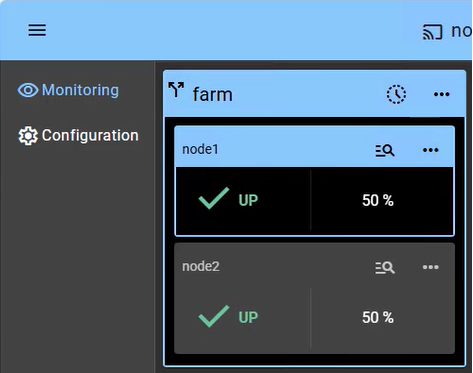
SafeKit Console: Monitoring a 2-node Farm cluster showing both nodes in UP state with active load balancing.

Monitoring a farm cluster provides visibility into the Active-Active nature of the infrastructure, where all nodes contribute to the application's performance (showing 2 nodes in this example; scalable to additional nodes):

  • UP State (50% on 2 nodes): In a healthy farm, both nodes are in the "UP" (50%) state, meaning they are both actively receiving and processing client requests via the shared Virtual IP.
  • Automatic Re-balancing: If one node fails, the console visually shows the remaining node taking 100% of the traffic. There is no "failover" delay, as the surviving node is already active (aside from a detection time of a few seconds).
  • Node Insertion: When a repaired node is restarted, it transitions from "STOP" to "UP" and automatically starts receiving its portion of the load without administrator intervention.
  • No Data Sync: Note that in a farm cluster, there is no "Orange" resynchronization state, as nodes are expected to be stateless or share a backend database (which can be protected separately in a mirror cluster).

Beyond simple status icons, the interface provides one-click node management (... menu), allowing you to manually stop or start a node for planned maintenance while the shared Virtual IP automatically redistributes traffic without interrupting user activity.

How to monitor multiple modules and multiple clusters via the web console?

Multi-module visualization within a single cluster

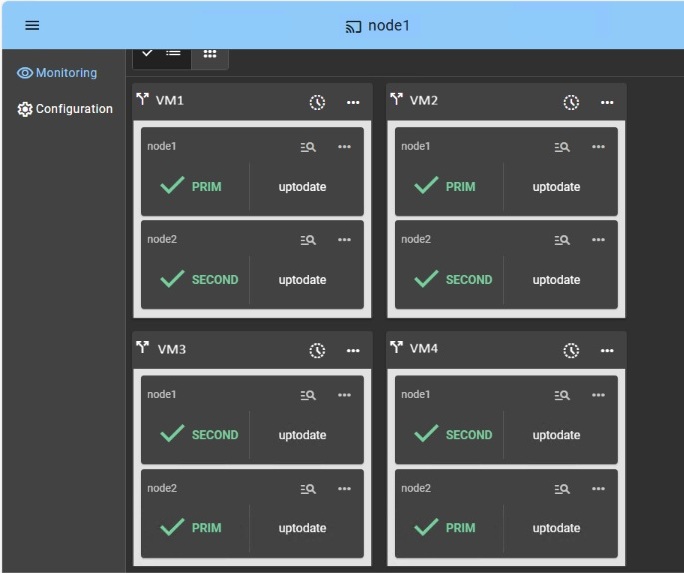
SafeKit Web Console: 4 Hyper-V modules deployed on the same 2-nodes cluster.

When deploying multiple modules on a single 2-node cluster, the SafeKit Web Console provides individual monitoring widgets for each module. This is particularly valuable for SafeKit Hyper-V solutions.

Example: In the figure with a setup with 4 protected VMs:

  • The console is connected to node1 which acts as a proxy to communicate with node2.
  • The console displays 4 widgets (one for each VM).
  • Each VM runs on its PRIM node and is replicated to its SECOND node.
  • Administrators can see in real-time that VM1 and VM2 are active on node1, while VM2 and VM3 are active on node 2.
  • Administrators can easily migrate a VM from one node to the other using the ... menu.

This granular visibility ensures that even in high-density environments, you maintain total control and immediate awareness of every replicated workload.

Multi-cluster visualization

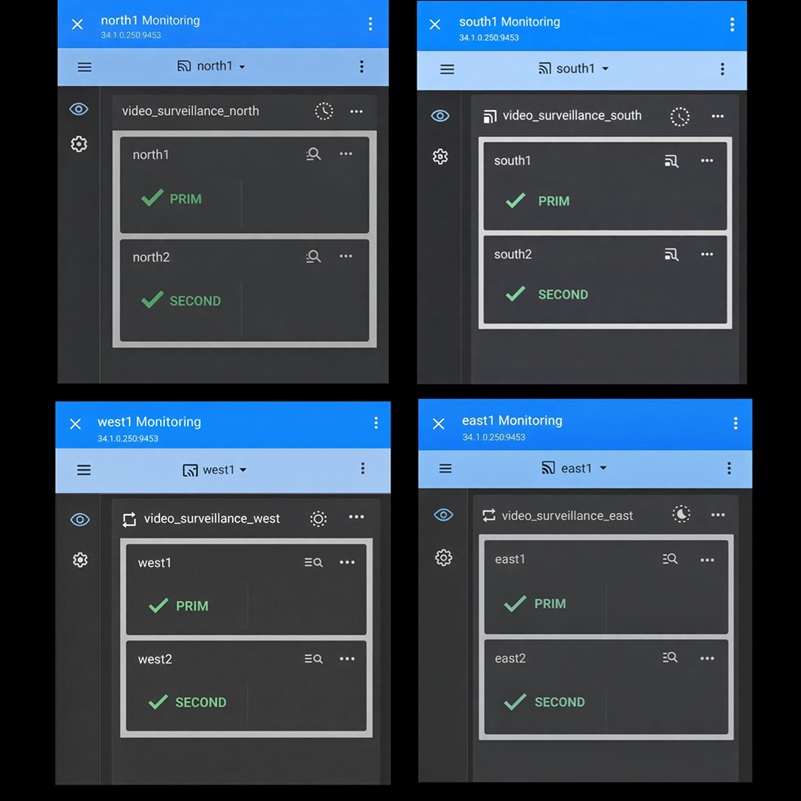
SafeKit Web Console: 4 clusters deployed on 8 servers.

When deploying multiple clusters across several servers, you can either use multiple browser tabs to connect to each cluster or utilize the console's PWA (Progressive Web App) feature. By using the PWA, you remove the browser's navigation menus, saving screen space to better organize cluster monitoring on your desktop.

Example: The figure shows four PWA consoles monitoring four video surveillance clusters: one in the north, south, west, and east.

Note: When you have too many clusters to display on a single desktop, SafeKit offers notifications to help detect errors across numerous clusters.

How to monitor alerts in the console and manage email notifications?

How can I receive instant alerts for module state changes and critical events?

The SafeKit web console leverages native browser capabilities to emit instant notifications whenever a module state change occurs. This ensures critical events are brought to your attention immediately, even when the console is in a background tab.

  • Security: Notifications require access via HTTPS or localhost.
  • PWA Integration: Install the console as a Progressive Web App (PWA) on desktop or mobile for a native app-like experience.
  • Mobile Alerts: On mobile, notifications are available exclusively through the PWA, with HTTPS being mandatory.

This mechanism alerts users immediately about critical events, enhancing prompt awareness of cluster status and reducing response times.

How can I set up automated email alerts in SafeKit?

SafeKit automatically logs all major cluster events into the system logs, enabling seamless integration with any monitoring tool on the market. Additionally, it includes a dedicated Email Notification Agent designed to monitor these logs and deliver critical alerts directly to your inbox. This ensures that stakeholders remain informed even when the web console is not being actively monitored.

  • Smart Grouping: To reduce noise, the agent groups events occurring within a short period into a single summary email.
  • Full Coverage: The agent is installed on all nodes and must be explicitly configured with SMTP details to be enabled.
  • Customizable Recipients: Direct alerts to specific IT teams or management aliases to ensure a prompt response.

By combining real-time PWA alerts with intelligent email grouping, SafeKit provides a multi-layered notification strategy for mission-critical operations.

🔍 SafeKit High Availability Navigation Hub

Explore SafeKit: Features, technical videos, documentation, and free trial
Resource Type Description Direct Link
Key Features Why Choose SafeKit for Simple and Cost-Effective High Availability? See Why Choose SafeKit for High Availability
Deployment Model All-in-One SANless HA: Shared-Nothing Software Clustering See SafeKit All-in-One SANless HA
Partners SafeKit: The Benchmark in High Availability for Partners See Why SafeKit Is the HA Benchmark for Partners
Use Cases Explore How SafeKit Ensures the High Availability of Critical Infrastructure See All Use Cases
HA Strategies SafeKit: Infrastructure (VM) vs. Application-Level High Availability See SafeKit HA & Redundancy: VM vs. Application Level
Technical Specifications Technical Limitations for SafeKit Clustering See SafeKit High Availability Limitations
Proof of Concept SafeKit: High Availability Configuration & Failover Demos See SafeKit Failover Tutorials
Architecture How the SafeKit Mirror Cluster works (Real-Time Replication & Failover) See SafeKit Mirror Cluster: Real-Time Replication & Failover
Architecture How the SafeKit Farm Cluster works (Network Load Balancing & Failover) See SafeKit Farm Cluster: Network Load Balancing & Failover
Competitive Advantages Comparison: SafeKit vs. Traditional High Availability (HA) Clusters See SafeKit vs. Traditional HA Cluster Comparison
Technical Resources SafeKit High Availability: Documentation, Downloads & Trial See SafeKit HA Free Trial & Technical Documentation
Pre-configured Solutions SafeKit Application Module Library: Ready-to-Use HA Solutions See SafeKit High Availability Application Modules