---
canonical: https://safekit.evidian.com/products/high-availability-software-for-application-clustering/milestone-xprotect-corporate-high-availability-synchronous-replication-failover/safekit-quick-installation-guide-with-milestone-xprotect-management-server/
---
Milestone XProtect High Availability with SafeKit: Install the milestone.safe Module for Failover - SafeKit HA
[](https://eviden.com)
* [SafeKit](/products/high-availability-software-for-application-clustering/)
+ - * SafeKit
---
* [Home SafeKit](https://safekit.evidian.com/)
* [Elevator pitch](https://safekit.evidian.com/products/high-availability-software-for-application-clustering/high-availability-software-ha-cluster-windows-linux/)
* [Customer use cases](https://safekit.evidian.com/products/high-availability-software-for-application-clustering/#safekit-use-cases)
- * Use cases
---
* [Best/Worst Use Cases](https://safekit.evidian.com/products/high-availability-software-for-application-clustering/best-worst-use-cases-high-availability/)
* [OEM use case for a software publisher](https://safekit.evidian.com/products/high-availability-software-for-application-clustering/application-clustering-software/)
* [Distributed Enterprise use case](https://safekit.evidian.com/products/high-availability-software-for-application-clustering/business-continuity-software/)
* [Remote sites and disaster recovery use case](https://safekit.evidian.com/products/high-availability-software-for-application-clustering/business-continuity-and-disaster-recovery-software/)
- * High Availability in Physical Security Market
---
* [Physical Security Software](https://safekit.evidian.com/products/high-availability-software-for-application-clustering/physical-security-software-redundancy/)
* [Video Management Software (VMS)](https://safekit.evidian.com/products/high-availability-software-for-application-clustering/video-management-software-vms-redundancy/)
* [Electronic Access Control Software (EACS)](https://safekit.evidian.com/products/high-availability-software-for-application-clustering/electronic-access-control-software-eacs-redundancy/)
* [Building Management System Software (BMS)](https://safekit.evidian.com/products/high-availability-software-for-application-clustering/building-management-system-software-bms-redundancy/)
* [SCADA Software](https://safekit.evidian.com/products/high-availability-software-for-application-clustering/scada-software-redundancy-high-availability/)
* [Solutions](https://safekit.evidian.com/products/high-availability-software-for-application-clustering/cluster-configuration/)
+ - * New application (real-time replication and failover)
---
* [Windows (mirror.safe)](https://safekit.evidian.com/products/high-availability-software-for-application-clustering/windows-high-availability-software-synchronous-replication-failover/)
* [Linux (mirror.safe)](https://safekit.evidian.com/products/high-availability-software-for-application-clustering/linux-high-availability-software-synchronous-replication-failover/)
* New application (network load balancing and failover)
---
* [Windows (farm.safe)](https://safekit.evidian.com/products/high-availability-software-for-application-clustering/windows-load-balancing-failover/)
* [Linux (farm.safe)](https://safekit.evidian.com/products/high-availability-software-for-application-clustering/linux-load-balancing-failover/)
- * Full VM or container real-time replication and failover
---
* [Hyper-V (hyperv.safe)](https://safekit.evidian.com/products/high-availability-software-for-application-clustering/hyper-v-replication-automatic-failover-load-balancing/)
* [KVM (kvm.safe)](https://safekit.evidian.com/products/high-availability-software-for-application-clustering/linux-kvm-high-availability-replication-automatic-failover-load-balancing/)
* [Docker (mirror.safe)](https://safekit.evidian.com/products/high-availability-software-for-application-clustering/docker-container-high-availability-cluster-synchronous-replication-failover/)
* [Podman (mirror.safe)](https://safekit.evidian.com/products/high-availability-software-for-application-clustering/podman-the-simplest-high-availability-cluster-between-two-redundant-servers/)
* [Kubernetes (k3s.safe)](https://safekit.evidian.com/products/high-availability-software-for-application-clustering/kubernetes-k3s-the-simplest-high-availability-cluster-with-synchronous-replication-and-failover-between-two-redundant-servers/)
- * Database (real-time replication and failover)
---
* [Microsoft SQL Server (sqlserver.safe)](https://safekit.evidian.com/products/high-availability-software-for-application-clustering/sql-server-high-availability-synchronous-replication-failover/)
* [PostgreSQL (postgresql.safe)](https://safekit.evidian.com/products/high-availability-software-for-application-clustering/postgresql-high-availability-synchronous-replication-failover/)
* [Oracle (oracle.safe)](https://safekit.evidian.com/products/high-availability-software-for-application-clustering/oracle-high-availability-synchronous-replication-failover/)
* [MySQL (mysql.safe)](https://safekit.evidian.com/products/high-availability-software-for-application-clustering/mysql-high-availability-synchronous-replication-failover/)
* [MariaDB (mysql.safe)](https://safekit.evidian.com/products/high-availability-software-for-application-clustering/mariadb-simplest-high-availability-cluster-synchronous-replication-failover-redundant-servers/)
* [Firebird (firebird.safe)](https://safekit.evidian.com/products/high-availability-software-for-application-clustering/firebird-high-availability-synchronous-replication-failover/)
* Web (network load balancing and failover)
---
* [Apache (apache\_farm.safe)](https://safekit.evidian.com/products/high-availability-software-for-application-clustering/apache-load-balancing-failover-2/)
* [Microsoft IIS (iis\_farm.safe)](https://safekit.evidian.com/products/high-availability-software-for-application-clustering/iis-load-balancing-failover/)
* [NGINX (farm.safe)](https://safekit.evidian.com/products/high-availability-software-for-application-clustering/nginx-the-simplest-load-balancing-cluster-with-failover/)
- * Amazon AWS
---
* [AWS (mirror.safe)](https://safekit.evidian.com/products/high-availability-software-for-application-clustering/aws-high-availability-cluster-synchronous-replication-failover/)
* [AWS (farm.safe)](https://safekit.evidian.com/products/high-availability-software-for-application-clustering/aws-load-balancing-cluster-failover/)
* Google GCP
---
* [GCP (mirror.safe)](https://safekit.evidian.com/products/high-availability-software-for-application-clustering/gcp-high-availability-cluster-synchronous-replication-failover/)
* [GCP (farm.safe)](https://safekit.evidian.com/products/high-availability-software-for-application-clustering/gcp-load-balancing-cluster-failover/)
* Microsoft Azure
---
* [Azure (mirror.safe)](https://safekit.evidian.com/products/high-availability-software-for-application-clustering/azure-high-availability-cluster-synchronous-replication-failover/)
* [Azure (farm.safe)](https://safekit.evidian.com/products/high-availability-software-for-application-clustering/azure-load-balancing-cluster-failover/)
* Other clouds
---
* [All cloud solutions](https://safekit.evidian.com/products/high-availability-software-for-application-clustering/cluster-in-cloud-computing-generic-solution-amazon-aws-microsoft-azure-google-gcp-other-clouds/)
* [Cloud (mirror.safe)](https://safekit.evidian.com/products/high-availability-software-for-application-clustering/cloud-high-availability-cluster-synchronous-replication-failover/)
* [Cloud (farm.safe)](https://safekit.evidian.com/products/high-availability-software-for-application-clustering/cloud-load-balancing-cluster-failover/)
- * Physical security (real-time replication and failover)
---
* [Milestone XProtect (milestone.safe)](https://safekit.evidian.com/products/high-availability-software-for-application-clustering/milestone-xprotect-corporate-high-availability-synchronous-replication-failover/)
* [Nedap (nedap.safe)](https://safekit.evidian.com/products/high-availability-software-for-application-clustering/nedap-high-availability-synchronous-replication-failover/)
* [Genetec SQL Server (sqlserver.safe)](https://safekit.evidian.com/products/high-availability-software-for-application-clustering/genetec-sql-server-the-simplest-high-availability-cluster-with-synchronous-replication-and-failover-between-two-redundant-servers/)
* [Bosch AMS (hyperv.safe)](https://safekit.evidian.com/products/high-availability-software-for-application-clustering/bosch-ams-the-simplest-high-availability-cluster-between-two-redundant-servers-without-shared-disk/)
* [Bosch BIS (hyperv.safe)](https://safekit.evidian.com/products/high-availability-software-for-application-clustering/bosch-bis-the-simplest-high-availability-cluster-between-two-redundant-servers-without-shared-disk/)
* [Bosch BVMS (hyperv.safe)](https://safekit.evidian.com/products/high-availability-software-for-application-clustering/bosch-bvms-the-simplest-high-availability-cluster-between-two-redundant-servers-without-shared-disk/)
* [Hanwha Vision (hyperv.safe)](https://safekit.evidian.com/products/high-availability-software-for-application-clustering/hanwha-vision-cluster-without-shared-storage-on-a-san/)
* [Hanwha Wisenet (hyperv.safe)](https://safekit.evidian.com/products/high-availability-software-for-application-clustering/hanwha-wisenet-wave-the-simplest-high-availability-cluster-between-two-redundant-servers-without-shared-disk/)
- * Siemens (real-time replication and failover)
---
* [Siemens Siveillance suite (hyperv.safe)](https://safekit.evidian.com/products/high-availability-software-for-application-clustering/siemens-siveillance-redundancy-high-availability-cluster-active-active/)
* [Siemens Desigo CC (hyperv.safe)](https://safekit.evidian.com/products/high-availability-software-for-application-clustering/siemens-desigo-cc-redundancy-high-availability-cluster-active-active/)
* [Siemens Siveillance VMS (SiveillanceVMS.safe)](https://safekit.evidian.com/products/high-availability-software-for-application-clustering/siemens-siveillance-vms-the-simplest-high-availability-cluster-between-two-redundant-servers/)
* [Siemens SiPass (hyperv.safe)](https://safekit.evidian.com/products/high-availability-software-for-application-clustering/siemens-sipass-redundancy-high-availability-cluster-active-active/)
* [Siemens SIPORT (hyperv.safe)](https://safekit.evidian.com/products/high-availability-software-for-application-clustering/siemens-siport-redundancy-high-availability-cluster-active-active/)
* [Siemens SIMATIC PCS 7 (hyperv.safe)](https://safekit.evidian.com/products/high-availability-software-for-application-clustering/siemens-simatic-pcs-7-redundancy-high-availability-cluster-active-active/)
* [Siemens SIMATIC WinCC (hyperv.safe)](https://safekit.evidian.com/products/high-availability-software-for-application-clustering/siemens-simatic-wincc-redundancy-high-availability-cluster-active-active/)
* [Architectures](#)
+ - * Basic architectures
---
* [Overview](https://safekit.evidian.com/products/high-availability-software-for-application-clustering/high-availability-architectures/)
* [Mirror Cluster](https://safekit.evidian.com/products/high-availability-software-for-application-clustering/file-replication-byte-level-with-failover-mirror-cluster/)
* [Farm Cluster](https://safekit.evidian.com/products/high-availability-software-for-application-clustering/network-load-balancing-cluster/)
* [SafeKit Console](https://safekit.evidian.com/products/high-availability-software-for-application-clustering/safekit-smart-console-your-high-availability-cluster-in-your-pocket/)
- * Advanced architectures
---
* [Farm+Mirror Cluster](https://safekit.evidian.com/products/high-availability-software-for-application-clustering/clustering-software-load-balancing-mirroring/)
* [Active Active Cluster with Replicaton](https://safekit.evidian.com/products/high-availability-software-for-application-clustering/active-active-cluster-real-time-replication/)
* [N-1 Cluster](https://safekit.evidian.com/products/high-availability-software-for-application-clustering/n-1-redundancy/)
- * Hypervisor architectures
---
* [Hyper-V Cluster](https://safekit.evidian.com/products/high-availability-software-for-application-clustering/hyper-v-replication-automatic-failover-load-balancing/)
* [KVM Cluster](https://safekit.evidian.com/products/high-availability-software-for-application-clustering/linux-kvm-high-availability-replication-automatic-failover-load-balancing/)
- * Container architectures
---
* [Docker Cluster](https://safekit.evidian.com/products/high-availability-software-for-application-clustering/docker-container-high-availability-cluster-synchronous-replication-failover/)
* [Podman Cluster](https://safekit.evidian.com/products/high-availability-software-for-application-clustering/podman-the-simplest-high-availability-cluster-between-two-redundant-servers/)
* [Best practises](#)
+ - * High availability best practises
---
* [High Availability Architectures & Software Clustering Best Practices](https://safekit.evidian.com/products/high-availability-software-for-application-clustering/high-availability-architectures-and-best-practices/)
* [Shared Nothing vs. Shared Disk Architecture: Choosing the Best HA Cluster](https://safekit.evidian.com/products/high-availability-software-for-application-clustering/shared-nothing-architecture-vs-shared-disk-architecture/)
* [Software clusering vs hardware clustering](https://safekit.evidian.com/products/high-availability-software-for-application-clustering/clustering-software-vs-hardware-clustering/)
* [VM HA vs. Application HA: Choose Your Redundancy Level with SafeKit](https://safekit.evidian.com/products/high-availability-software-for-application-clustering/vm-ha-vs-application-ha/)
* [High Availability and Disaster Recovery (HADR)](https://safekit.evidian.com/products/high-availability-software-for-application-clustering/high-availability-disaster-recovery-hadr/)
* [HA Cluster vs. Fault Tolerant System: Choosing the Right Redundancy Strategy](https://safekit.evidian.com/products/high-availability-software-for-application-clustering/high-availability-cluster-vs-fault-tolerant-system/)
* [How to Implement Redundant Servers with Simple HA Software](https://safekit.evidian.com/products/high-availability-software-for-application-clustering/how-to-implement-redundant-servers-with-a-simple-software-windows-linux/)
- * Replication best practises
---
* [Data Replication Techniques for High Availability: A Complete Comparison](https://safekit.evidian.com/products/high-availability-software-for-application-clustering/data-replication-techniques/)
* [Synchronous vs. Asynchronous Replication: How SafeKit Ensures Zero Data Loss?](https://safekit.evidian.com/products/high-availability-software-for-application-clustering/synchronous-replication-vs-asynchronous-replication/)
* [Byte-Level File Replication vs. Block-Level Disk Replication for HA](https://safekit.evidian.com/products/high-availability-software-for-application-clustering/byte-level-file-replication-vs-block-level-disk-replication/)
* [Alternative to SQL Server Always On: HA for Express and Standard Editions](https://safekit.evidian.com/products/high-availability-software-for-application-clustering/alternative-always-on-sql-server-express-standard-editions/)
- * Clustering best practises
---
* [How a Virtual IP Address (VIP) Works in High Availability Clustering?](https://safekit.evidian.com/products/high-availability-software-for-application-clustering/how-a-virtual-ip-address-works/)
* [Handling Power Outages and Network Isolation in a HA Cluster](https://safekit.evidian.com/products/high-availability-software-for-application-clustering/power-outage-and-network-isolation-in-a-cluster/)
* [Heartbeat, failover and quorum in a cluster](https://safekit.evidian.com/products/high-availability-software-for-application-clustering/heartbeat-failover-quorum-windows-linux-aix-cluster/)
* [SAN vs. NAS Shared Storage for Failover Clustering: A Detailed Comparison](https://safekit.evidian.com/products/high-availability-software-for-application-clustering/san-vs-nas-shared-storage-for-a-failover-cluster/)
* [What are RPO and RTO? Definitions, Examples, and HA Strategies](https://safekit.evidian.com/products/high-availability-software-for-application-clustering/what-is-rpo-and-rto-with-examples/)
* [Microsoft NLB vs SafeKit network load balancing](https://safekit.evidian.com/products/high-availability-software-for-application-clustering/microsoft-nlb-vmware-multicast-unicast-alternative/)
* [Resources](#)
+ - * Free trial
---
* [SafeKit free trial](https://safekit.evidian.com/products/high-availability-software-for-application-clustering/safekit-free-trial/)
* [One-month license key](https://safekit.evidian.com/products/high-availability-software-for-application-clustering/high-availability-and-load-balancing-cluster-key/)
* [Demonstrations](https://safekit.evidian.com/products/high-availability-software-for-application-clustering/high-availability-solutions-ha-solutions-videos/)
* [Support](https://safekit.evidian.com/products/high-availability-software-for-application-clustering/safekit-support/)
* [Free Training & Certification](https://safekit.evidian.com/products/high-availability-software-for-application-clustering/safekit-on-line-training/)
- * Technical documentations
---
* [SafeKit quick installation guides](https://safekit.evidian.com/products/high-availability-software-for-application-clustering/safekit-quick-installation-guides/)
* [SafeKit user's guide](https://safekit.evidian.com/products/high-availability-software-for-application-clustering/safekit-user-guide-82/)
* [SafeKit release notes](https://safekit.evidian.com/products/high-availability-software-for-application-clustering/safekit-release-notes-8-2/)
* [SafeKit SRB](https://safekit.evidian.com/wp-content/uploads/downloads_safekit/version-82/82softwarereleasebulletin.pdf)
* [Knowledge Base](https://safekit.evidian.com/wp-content/uploads/downloads_safekit/version-82/knowledge-base.pdf)
- * Product information
---
* [Flyer](https://safekit.evidian.com/wp-content/uploads/documents/high-availability-overview.pdf)
* [White Paper - Product](https://safekit.evidian.com/products/high-availability-software-for-application-clustering/high-availability-white-paper/)
* [White Paper - High Availability Guide](https://safekit.evidian.com/products/high-availability-software-for-application-clustering/high-availability-guide/)
* [Technical Reference for RFI and RFP](https://safekit.evidian.com/products/high-availability-software-for-application-clustering/high-availability-technical-reference-for-rfi-and-rfp-preparation/)
* [Support](https://safekit.evidian.com/products/high-availability-software-for-application-clustering/safekit-support/)
* [Price](https://safekit.evidian.com/products/high-availability-software-for-application-clustering/get-a-quote-safekit-en/)
* [Contact](https://safekit.evidian.com/products/high-availability-software-for-application-clustering/contact-us-for-safekit/)
* [](https://safekit.evidian.com/products/high-availability-software-for-application-clustering/milestone-xprotect-corporate-high-availability-synchronous-replication-failover/safekit-quick-installation-guide-with-milestone-xprotect-management-server/)
[Eviden >](https://eviden.com/) [Products >](https://safekit.evidian.com/products/) [SafeKit: All-in-One SANless High Availability & Application Clustering Software >](https://safekit.evidian.com/) [The Simplest Milestone XProtect High Availability: 2-Node Synchronous Replication & Failover >](https://safekit.evidian.com/products/high-availability-software-for-application-clustering/milestone-xprotect-corporate-high-availability-synchronous-replication-failover/) Milestone XProtect High Availability with SafeKit: Install the milestone.safe Module for Failover
# Milestone XProtect High Availability with SafeKit: Install the milestone.safe Module for Failover
## Configuring milestone.safe for Synchronous Replication & 2-Node SANless Clustering
[🧑 Contact us](https://safekit.evidian.com/products/high-availability-software-for-application-clustering/contact-us-for-safekit/)
[🎁 SafeKit free trial](https://safekit.evidian.com/products/high-availability-software-for-application-clustering/safekit-free-trial/)
[🏅 Free certification](https://training.my.evidian.com/mod/page/view.php?id=712)
[💰 Perpetual license cost](https://safekit.evidian.com/products/high-availability-software-for-application-clustering/get-a-quote-safekit-en/)
## High Availability Quick Installation Guide for Milestone XProtect
This guide explains how to set up a **mirror cluster** for Milestone XProtect using SafeKit, ensuring automatic failover and synchronous replication without the need for shared storage.
You can use the SafeKit AI 🤖 for assistance at any time.
### 1. Overview
* **Architecture:** Uses a two-node system (Primary/Secondary).
* **Data Protection:** Implements real-time synchronous replication for **zero data loss** (RPO=0).
### 2. Installation
* **Software:** Install the SafeKit engine on both servers.
* **Module:** Download the pre-configured `milestone.safe` application module.
### 3. Configuration
* **Web Console:** Configure the specific folders containing the Milestone XProtect files.
* **Monitoring:** Start monitoring and protecting the Milestone XProtect application.
## Overview of the SafeKit / Milestone XProtect solution
The solution is described here: **[The Simplest Milestone XProtect High Availability: 2-Node Synchronous Replication & Failover](https://safekit.evidian.com/products/high-availability-software-for-application-clustering/milestone-xprotect-corporate-high-availability-synchronous-replication-failover/)**.
## Installation of the SafeKit / Milestone XProtect solution on Windows (milestone.safe)
### Prerequisites
* You need Milestone XProtect Management and SQL installed on 2 nodes (virtual machines or physical servers). SQL Server and Event Srver can be external, see the notes below.

Note: SQL Server can be external. In this case, at step 4 during the step by step configuration of milestone.safe:
* remove the replication of SQL Data and Log folders,
* remove the process checker on sqlservr.exe,
* remove MSSQLServer from the macro SERVICES.
You can implement redundancy of the external SQL Server with [SafeKit and the sqlserver.safe module](https://safekit.evidian.com/products/high-availability-software-for-application-clustering/sql-server-high-availability-synchronous-replication-failover/#trial).
In this case on both management nodes, configure the [connection of Milestone Management to SQL](https://doc.milestonesys.com/latest/en-US/standard_features/sf_mc/sf_maintenance/mc_managingthesqlserver.htm) with the virtual IP address of the sqlserver.safe module (registry key HKEY\_LOCAL\_MACHINESOFTWAREVideoOSServerConnectionString).

Note: The Event server can be external to the Management server.
In this case, you have 2 clusters with 2 installations of milestone.safe: one for the Management cluster, the other one for the Event cluster.
For the Management cluster, at step 4 during the step by step configuration of milestone.safe:
* remove MilestoneEventServerService from the SERVICES macro.
And for the Event cluster, at step 4 during the step by step configuration of milestone.safe:
* remove from the SERVICES macro: MSSQLServer, Milestone XProtect Management Server, Milestone XProtect Log Server,
* remove the replication of SQL Data and Log folders,
* remove the process checker on sqlservr.exe,
* during the step-by-step configuration, [register](/wp-content/uploads/2022/07/milestone-management-server-register-2020.png) the Event server with the virtual IP address of the **Management cluster** (or [install](https://developer.milestonesys.com/s/article/XProtect-Corporate-Download-Manager-download-web-page) the Event server from the Download Manager and set the virtual IP address of the **Management cluster** during the installation),
* in the Milestone management client, set the Event Server with the virtual IP address of the **Event cluster** in the [Registered Services](/wp-content/uploads/2022/07/milestone-url-vip.png).

### Recorder redundancy
* Replication of recorders is not suitable for SafeKit due to the volume of data.
* The solution integrated into Milestone can be used (failover recording server without real-time replication).
* Two recorders can also run in an active/active configuration and the cameras are distributed so as not to lose all the cameras in the same area in the event of a failure.
* The stream from each camera can also be sent to two recorders with the [Vega / RMF](https://vega25.com/) solution.

In case of migration of Milestone from version N to version N+1 in a SafeKit cluster, read this article: [Milestone Management Migration with SafeKit](https://safekit.evidian.com/products/high-availability-software-for-application-clustering/milestone-management-migration-with-safekit/)
### Package installation on Windows
* Download and install the free version of SafeKit on 2 Windows nodes.
Note: the free version includes all SafeKit features. At the end of the trial, you can activate permanent license keys without uninstalling the package.
* Upon completing the package installation, select **Set console credentials and firewall rules now** and configure a password for the **admin** user of the SafeKit console.
**Set the same password on all nodes.**
* Exclude from antivirus scans **C:/safekit/** (the default installation directory) and **all replicated folders** that you are going to define.
Antiviruses may face detection challenges with SafeKit due to its close integration with the OS, virtual IP mechanisms, real-time replication and restart of critical services.
[Download SafeKit (Windows) >](https://safekit.evidian.com/products/high-availability-software-for-application-clustering/safekit-free-trial/)
### Module installation on Windows
* Download the milestone.safe module. The module is free. It contains the files userconfig.xml and the restart scripts.
* Put **milestone.safe** under **C:/safekit/Application\_Modules/generic**.
[Download milestone.safe (Windows) >](https://safekit.evidian.com/wp-content/uploads/downloads_safekit/version-82/modules_windows/milestone.safe)
## Step by step configuration of the SafeKit / Milestone XProtect solution
### Prerequisites
* Milestone XProtect and SQL application installed on 2 nodes.
* Total replicated data limited to a few terabytes — beyond this, resynchronization time becomes significant.
* Minimum 1Gb/s interconnect between nodes (10Gb/s recommended for faster resynchronization).
* IP failover requires both nodes on the same LAN or extended LAN (L2) — routed L3 networks not supported.

This configuration requires **at least Milestone XProtect 2023 R3**. For previous versions, please [see this article](https://safekit.evidian.com/products/high-availability-software-for-application-clustering/insert-safekit-milestone-configuration-en/?app=Milestone%20XProtect%20and%20SQL&mod=milestone).
### 1. Launch the SafeKit console
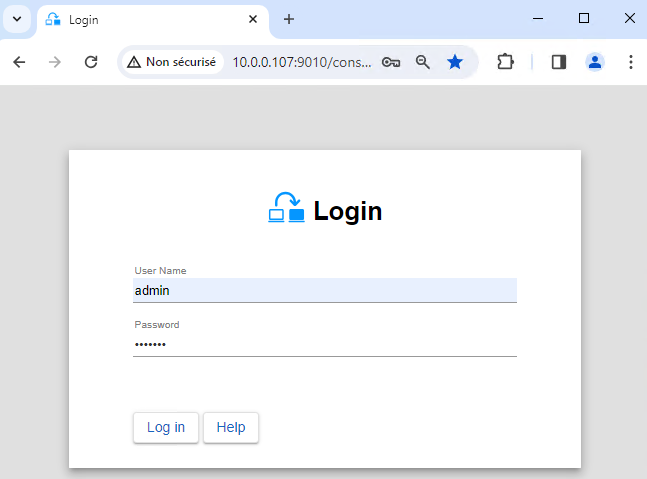
* Launch the web console in a browser on one cluster node by connecting to `http://localhost:9010`.
* Enter `admin` as user name and the password defined during installation.
You can also run the console in a browser on a workstation external to the cluster.

The configuration of SafeKit is done on both nodes from a single browser.

To secure the web console, see [11. Securing the SafeKit web service](https://safekit.evidian.com/products/high-availability-software-for-application-clustering/safekit-user-guide-82/#https) in the User's Guide.
[](/wp-content/uploads/2024/03/01-login-large.png)
### 2. Configure node addresses
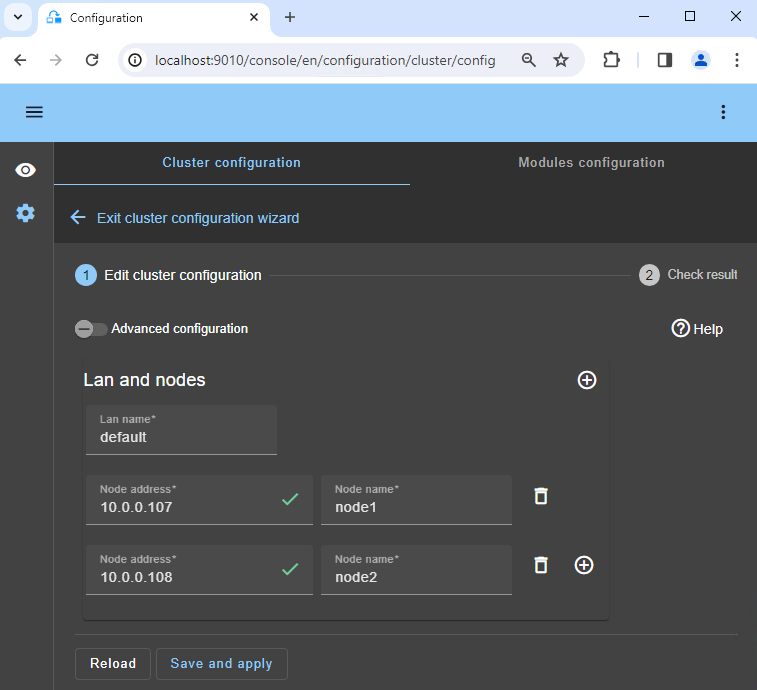
* Enter the node IP addresses, press the `Tab key` to check connectivity and fill node names. If either node1 or node2 has a red color, check connectivity of the browser to both nodes and check firewall on both nodes for [troubleshooting](https://safekit.evidian.com/products/high-availability-software-for-application-clustering/safekit-user-guide-82/#Troubleshooting).
* Then, click on `Save and apply` to save the configuration.
* Check the `Success` ✅ message on both nodes.
* If the configuration `Failure` ❌ occurs on one node, open the ▼ accordion for that node and review the messages. Note that you can use the SafeKit AI 🤖 for assistance.

If you want, you can add a new `LAN and nodes` ( first ➕) to create a second heartbeat and a dedicated replication network.

If you click on `Advanced configuration`, the `cluster.xml` file is displayed. This file is automatically populated by the console and deployed on the nodes.
[](/wp-content/uploads/2024/03/02-cluster-edit.png)
### 3. Select a module
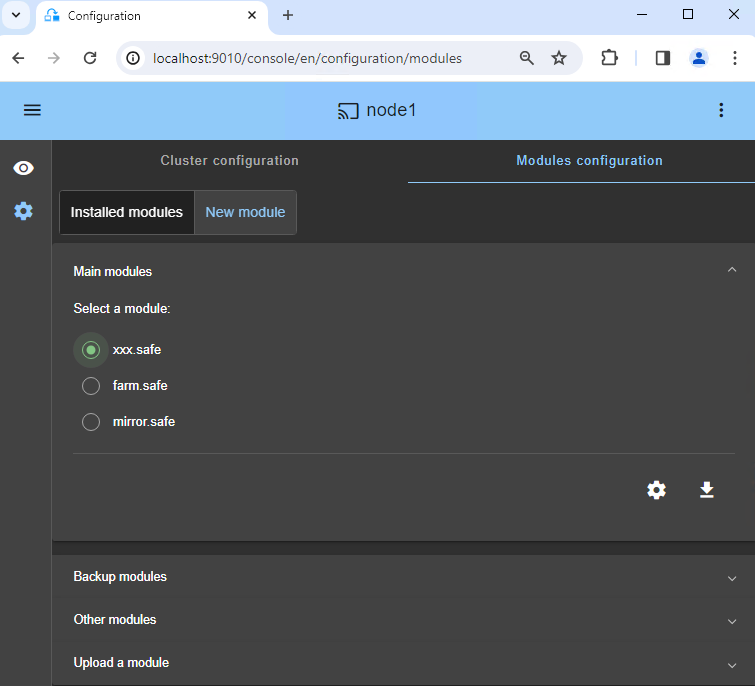
* In `New module`, click on the `milestone.safe` module.

In the blue banner at the top, 🛜 `node1` represents the console connection node. This node relays requests to `node2` when required.

The console looks for `xxx.safe` in the `Application_Modules/generic/` directory on the connection node (`node1`) if you placed a module there during installation.
[](/wp-content/uploads/2024/03/04-module-new.png)
### 4. Configure the module
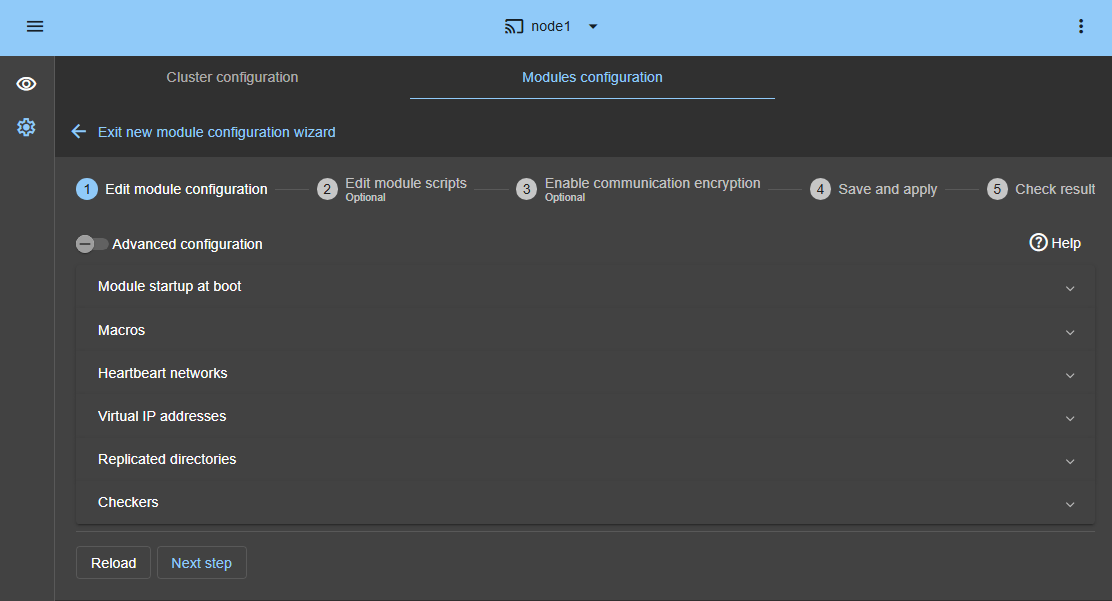
* In `Module startup at boot`, choose an automatic start of the module at boot without delay.
* In `Macros` / `SERVICES`, enter the service names of your application, in the startup order, separated by commas. See this screenshot for a visual example of [Milestone XProtect services 🖼️](/wp-content/uploads/2025/05/milestone-services.png).
* In `Heartbeat networks`, you should have a single heartbeat network on which the replication is made. If you have added a private LAN at step 2, then you can configure two heartbeats with the replication flow on the private LAN.
* In `Virtual IP addresses`, enter a virtual IP address. A virtual IP address is a standard IP address in the same IP network (same subnet) as the IP addresses of both nodes.
Application clients must be configured with the virtual IP address (or the DNS name associated with the virtual IP address).
The virtual IP address is automatically switched in the event of a failure.
* In `Replicated directories`, set the paths of directories to replicate. Check that they exist on both nodes and contain the application data.
Data and log replication are essential for a database.
You can create additional replicated directories as required.
See this screenshot for a visual example of [Milestone XProtect SQL replication 🖼️](/wp-content/uploads/2025/05/milestone-replication.png).
* In `Checkers`, you will be able to configure checkers if needed, such as process monitoring, custom checkers, TCP, ping, or split-brain checkers.
For example, if a process name is displayed in `Monitored processes/services`, it will be monitored with a restart action in case of failure. Configuring a wrong process name will cause the module to stop right after its start.

If SQL is on the management server:
* The [SQL system databases](https://learn.microsoft.com/en-us/sql/relational-databases/databases/system-databases) (like master.mdf and mastlog.ldf) must be located in the same directories on both nodes. The directories must be configured as replicated.
* SQL must be also installed at the same location in the file system on both nodes because the read-only [SQL resource database](https://learn.microsoft.com/en-us/sql/relational-databases/databases/resource-database) is located in the binary and is required for the failover. This database does not need to be replicated.
* The SQL Milestone databases (.mdf and .ldf) must be located in the same directories on both nodes. The directories must be configured as replicated. Milestone databases are as follows according this [article](https://doc.milestonesys.com/latest/en-US/standard_features/sf_mc/sf_maintenance/mc_managingthesqlserver.htm).

If you click on `Advanced configuration`, the `userconfig.xml` file is displayed. This file is automatically populated by the console and deployed on the nodes with the restart scripts.

When you apply the SafeKit configuration, the `startup type` of services is automatically set to `Manual` in Windows Services. This ensures that the services do not start automatically when the system boots, but are instead started only when the module itself is started.
[](/wp-content/uploads/2025/05/05-module-mirror-edit-config-3.png)
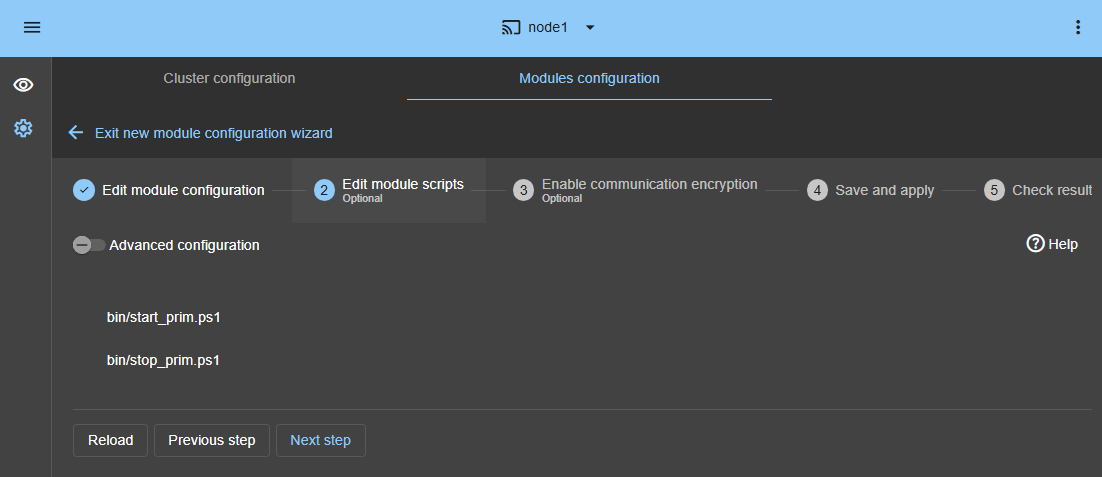
### 5. Edit scripts (optional)
* This step is optional and can be skipped in most cases, as the restart scripts are already pre-configured to restart services defined in the previous step.
* So, click directly on `Next step`.
* `start_prim.ps1` starts all services in the order specified in the `SERVICES` list, and starts the `IIS application pools` used by Milestone. `stop_prim.ps1` stops all services in the reverse order.
* Additionally, `start_prim.ps1` checks the startup of each service and stops the module if any service fails to start correctly.
[](/wp-content/uploads/2025/05/28-module-sqlserver-edit-script-3.png)
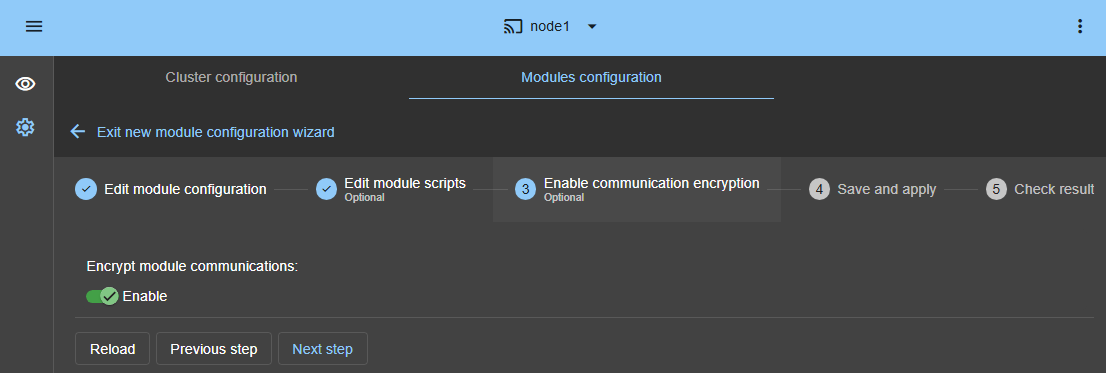
### 6. Communication encryption (optional)
* Keep encryption of communication between nodes.
[](/wp-content/uploads/2025/05/07-module-encryption-1.png)
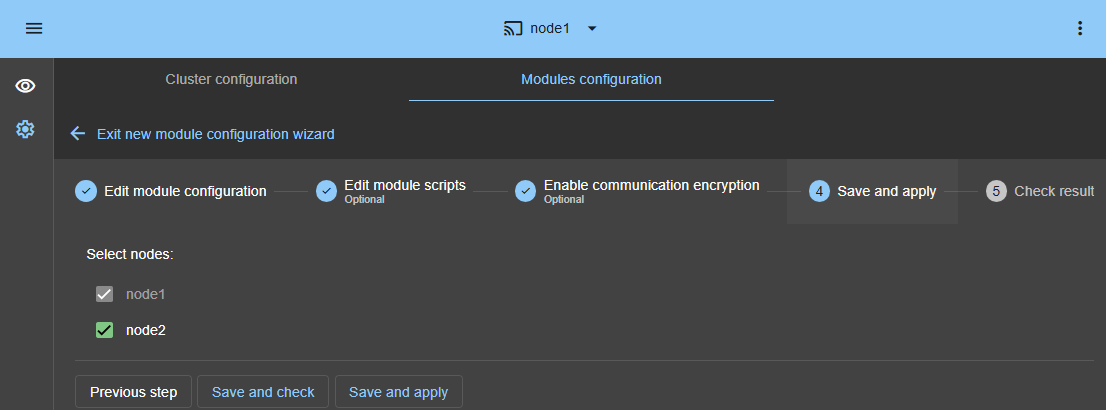
### 7. Save and apply
* `Save and apply` the configuration and scripts on both nodes.
[](/wp-content/uploads/2025/05/08-module-save-1.png)
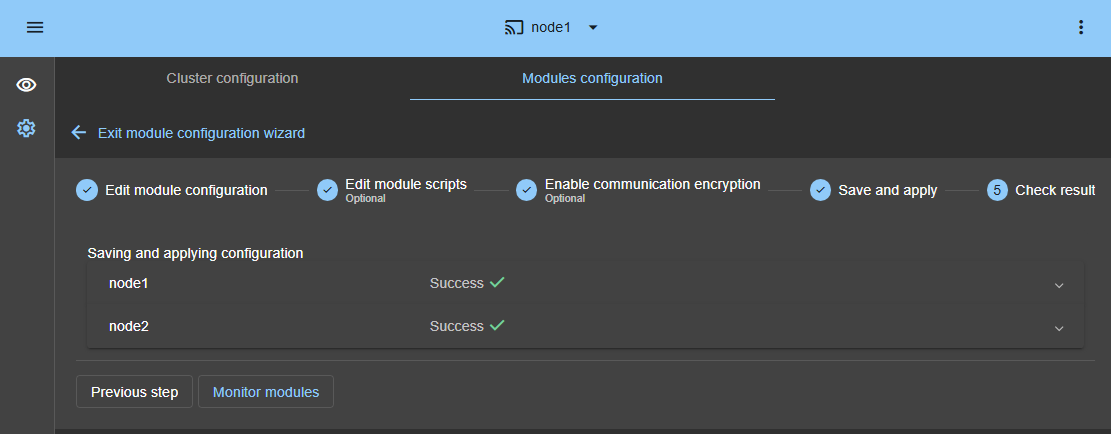
### 8. Verify successful configuration
* Check the `Success` ✅ message on both nodes and click on `Monitor modules`.
* If the configuration `Failure` ❌ occurs on one node, open the ▼ accordion for that node and review the messages. Note that you can use the SafeKit AI 🤖 for assistance.
[](/wp-content/uploads/2025/05/09-module-save-check-1.png)
### 9. Start the node with up-to-date data
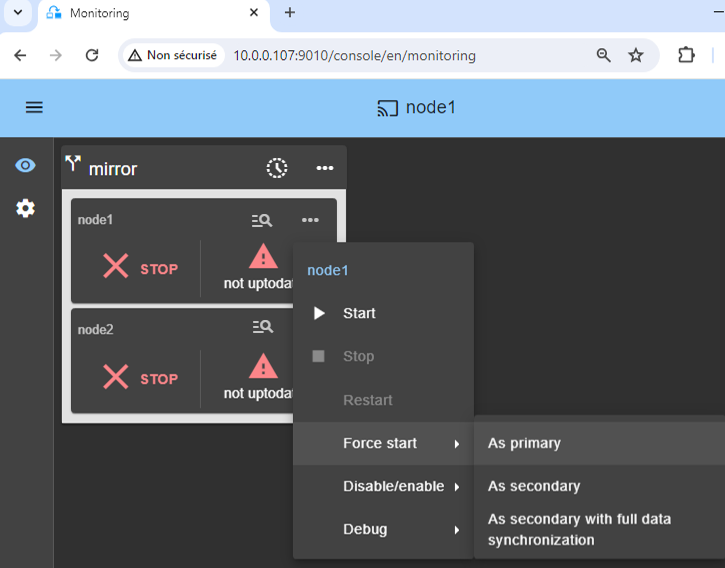
* If node 1 has the up-to-date replicated directories, select it and ⋯ `Force start` ▶ `As primary`.
When node 2 will be started, all data will be copied from node 1 to node 2.

If you make the wrong choice, you run the risk of synchronizing outdated data on both nodes.

It is also assumed that the Milestone XProtect and SQL application is stopped on node 1 so that SafeKit installs the replication mechanisms and then starts the application in the `start_prim` script.

Use `Start` for subsequent starts: SafeKit retains the most up-to-date server. Starting `As primary` is a special start-up the first time or during exceptional operations.
[](/wp-content/uploads/2024/03/10-monitoring-mirror-stop-stop-prim.png)
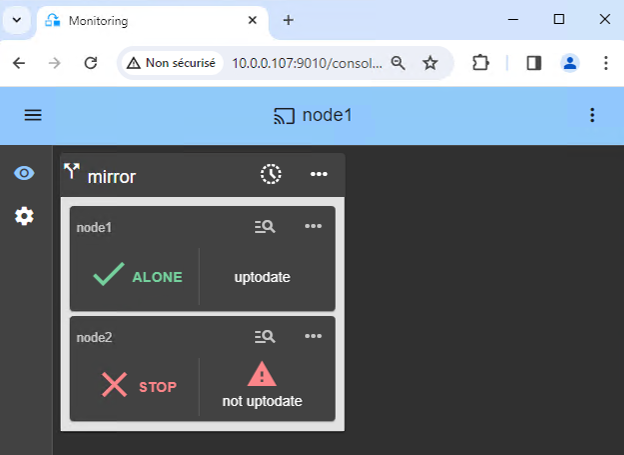
### 10. Wait for the transition to ALONE (green)
* Node 1 should reach the ALONE (green) state, which means that the virtual IP is set and that the `start_prim` script has been executed on node 1.

If ALONE (green) is not reached or if the application is not started, analyze why with the [module log 🖼️](/wp-content/uploads/2024/03/24-module-log-script.png) of node 1.
* Click the 🔍 **log** icon of `node1` to open the module log and look for error messages such as a checker detecting an error and stopping the module.
* Click on `start_prim` in the log: output messages of the script are displayed on the right and errors can be detected such as a service incorrectly started.
* Use the SafeKit AI 🤖 for assistance with log messages.

If the cluster is in `WAIT (red) not uptodate, STOP (red) not uptodate` state, stop the WAIT node and [force its start as primary 🖼️](/wp-content/uploads/2024/03/10-monitoring-mirror-stop-stop-prim.png).
[](/wp-content/uploads/2024/03/12-monitoring-alone-stop.png)
### 11. In the desktop of node 1, stop, then register on the vitual IP address, apply the Milestone KB and restart the Milestone Management Server
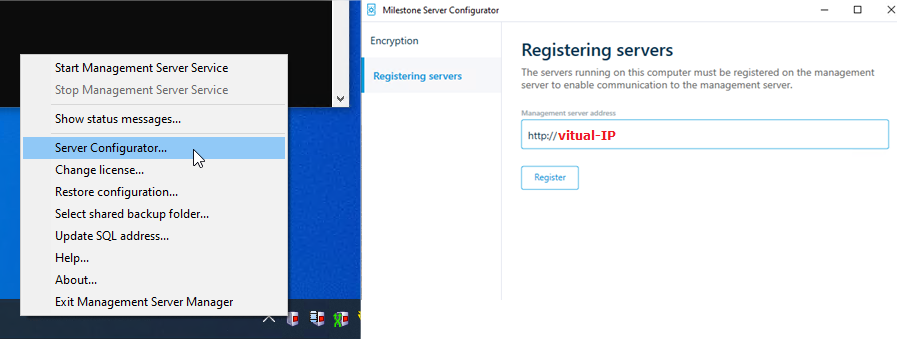
Execute the following bullets on node 1 according the menu in the image:
* Use the **ALONE** menu of the SafeKit console to disable **Checkers** and **Process/Service Monitoring** to prevent false detections when stopping the Management Server Service ([suspend the checker 🖼️](/wp-content/uploads/2024/04/safekit-disable-checkers.png)).
* Right-click on the **Milestone Management Server** icon in the taskbar.
* **Stop Management Server Service**
* Then choose **Server Configurator...** and register the virtual IP address.
* **Edit the ServerConfig.xml** on node1.Go to "C:/ProgramData/Milestone/XProtect Management Server" and backup the original ServerConfig.xml file. Open the ServerConfig.xml with any text editor (with Administrator rights) and:
+ `...XXX.XXX.XXX.XXX...`: replace the `XXX.XXX.XXX.XXX` with the actual virtual IP address.
+ Change `false` to `true`
+ Set `http://NODE1_FQDN:9010` (or NODE1 hostname if workgroup).
For more information, see this **[Milestone KB](https://milestonesys.my.site.com/developer/s/article/Management-Client-and-Smart-Client-are-not-functioning-properly-after-node-switch-in-a-clustered-Management-Server-setup)**.
* **Start Management Server Service**
* Use the **ALONE** menu of the SafeKit console to enable **Checkers** and **Process/Service Monitoring** ([enable the checker 🖼️](/wp-content/uploads/2024/04/safekit-disable-checkers.png)).

This procedure registers the node 1 management server in the SQL database (running on node 1) through a connection to the virtual address.
[](/wp-content/uploads/2022/07/milestone-management-server-register-2020.png)
### 12. In the desktop of node 2, register the management server on the vitual IP address
* Choose **Server Configurator** in the taskbar of node 2 and register it on the virtual IP address (see image).
* Then **Stop Management Server Service**.
* **Edit the ServerConfig.xml** on node2. Go to "C:/ProgramData/Milestone/XProtect Management Server" and backup the original ServerConfig.xml file. Open the ServerConfig.xml with any text editor (with Administrator rights) and:
+ `...XXX.XXX.XXX.XXX...`: replace the `XXX.XXX.XXX.XXX` with the actual virtual IP address.
+ Change `false` to `true`
+ Set `http://NODE2_FQDN:9010` (or NODE2 hostname if workgroup).
For more information, see this **[Milestone KB](https://milestonesys.my.site.com/developer/s/article/Management-Client-and-Smart-Client-are-not-functioning-properly-after-node-switch-in-a-clustered-Management-Server-setup)**.

The account of the user executing the registration on node 2 must have the administrator role in Milestone on node 1.
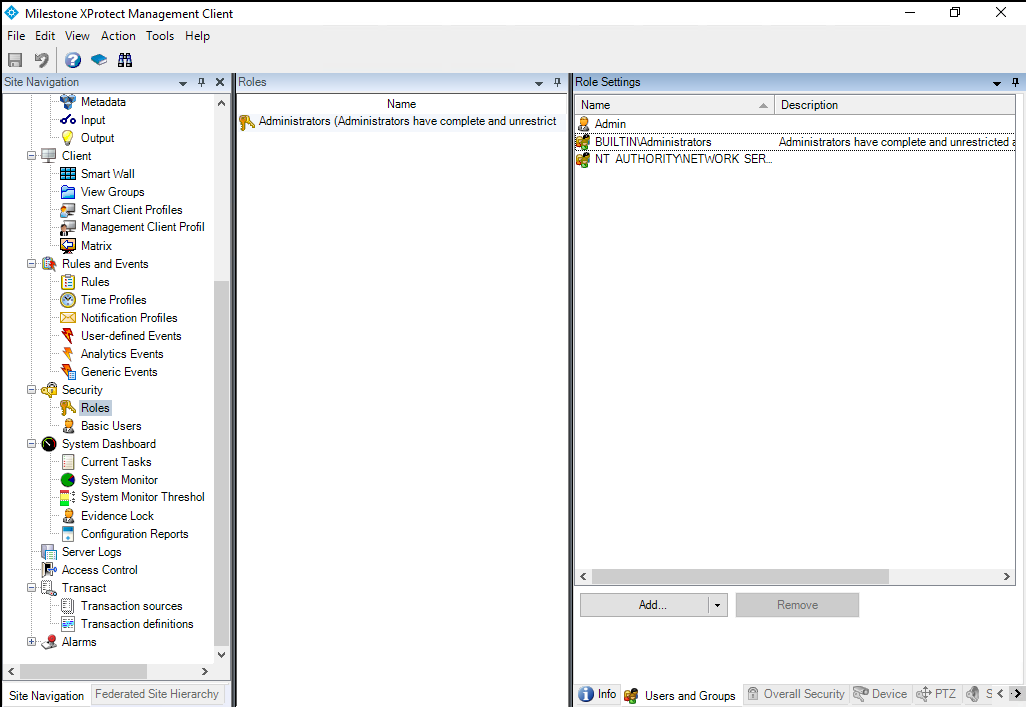
If it is the local administrator on node 2 who makes the registration, the built-in Windows group `BUILTIN/Administrators` must have been set in Management Client / Security / Roles at [Step 13](#role). Else the registration will not work.

This procedure registers the node 2 management server in the SQL database (running on node 1) through a connection to the virtual address.
[](/wp-content/uploads/2022/07/milestone-management-server-register-2020.png)
### 13. Solve Windows authentication issue on failover
When you start the Milestone XProtect Management Client, you have to authenticate using one of the following methods. Depending on your choice, specific steps are required to ensure the login works after a SafeKit failover. Reference: [View Login Screenshot 🖼️](/wp-content/uploads/2022/07/milestone-management-server-connect.png).
#### Windows authentication with Active Directory (AD)
**Configuration:** No special configuration is required.
If Milestone "Windows authentication" is configured with an Active Directory, the user and password information is retrieved from the external AD. After a failover, the secondary node connects to the same AD, so authentication works automatically.
#### Windows authentication in Workgroup
**Configuration:** You must add the **BUILTIN/Administrators** group in "Security / Roles".
**Warning:** In a Workgroup, local users have different Security Identifiers (SIDs) on each node, even if the names are identical. Only the BUILTIN/Administrators group has the same SID on both nodes.
* By adding this group, you can authenticate on the secondary node with any local administrator account after a failover.
* Without this, local Windows authentication will fail on the secondary node because the SIDs will not match.
#### Basic authentication with SQL database
**Configuration:** Create a user with "Basic authentication" (e.g., "Admin").
For "Basic authentication", the user credentials are stored directly in the SQL database. Because SafeKit replicates the SQL database to the secondary node in real-time, these users are always available immediately after a failover.
[](/wp-content/uploads/2022/07/milestone-management-server-roles.png)
### 14. Start node 2
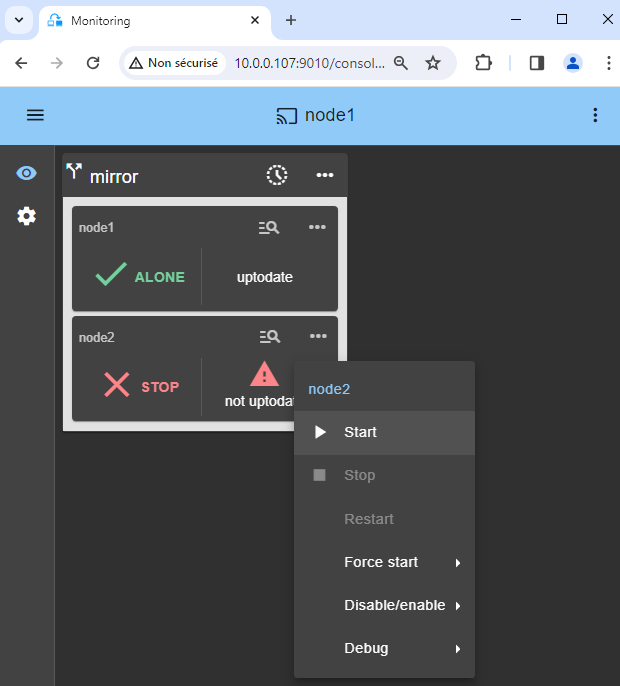
* ⋯ `Start` node 2 with its contextual menu.
* Wait for the SECOND (green) state.

Node 2 stays in the SECOND (orange) state while resynchronizing the replicated directories (copy from node 1 to node 2).
This may take a while depending on the size of files to resynchronize in replicated directories and the network bandwidth.
To see the progress of the copy, see the [module log 🖼️](/wp-content/uploads/2024/03/27-module-log-reintegration.png) and the [replication resources 🖼️](/wp-content/uploads/2024/03/26-replication-resources-reintegration.png) of node 2. Use the SafeKit AI 🤖 for assistance with log messages.
[](/wp-content/uploads/2024/03/13-monitoring-alone-stop-start.png)
### 15. Verify that the cluster is operational
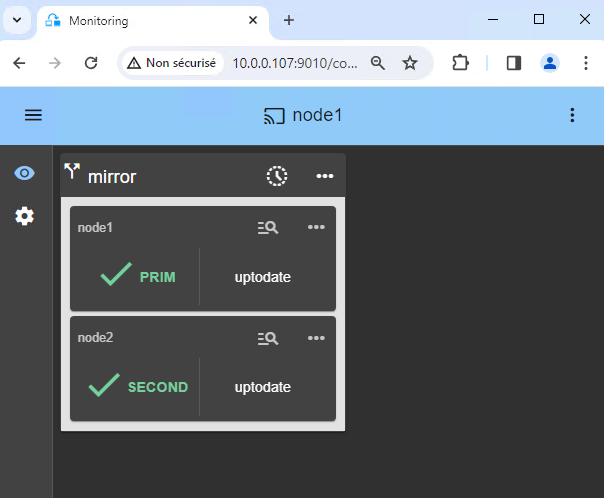
* Check that the cluster is green/green with Milestone XProtect and SQL services running on the PRIM node and not running on the SECOND node.
* Only changes inside files are replicated in real time in this state.

* Register the **recording servers** with the virtual IP address.
* Connect the **Milestone Management Client** and the **Milestone Smart Client** on the virtual IP address.
Components that are clients of Milestone XProtect and SQL services must be configured with the virtual IP address. The configuration can be done with a DNS name (if a DNS name has been created and associated with the virtual IP address).
[](/wp-content/uploads/2024/03/14-monitoring-prim-second.png)
### 16. Testing
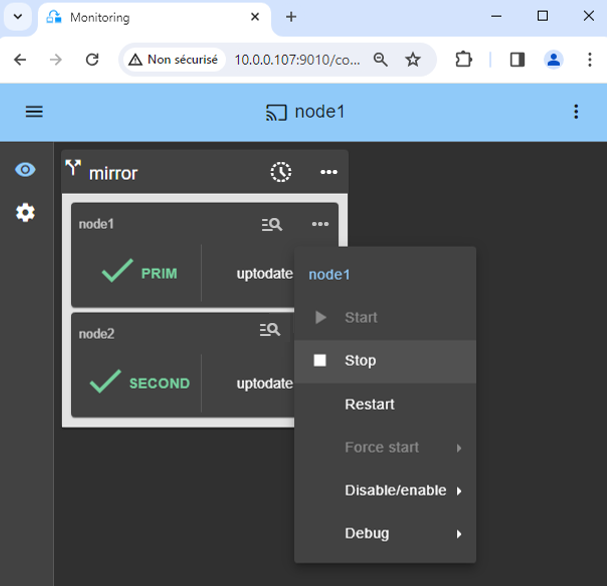
* Stop the PRIM node by scrolling down its contextual menu and clicking `Stop`.
* Verify that there is a failover on the SECOND node which should become ALONE (green).
* And with Microsoft Management Console (MMC) on Windows or with command lines on Linux, check the failover of Milestone XProtect and SQL services (stopped on node 1 in the `stop_prim` script and started on node 2 in the `start_prim` script).

If ALONE (green) is not reached on node2 or if the application is not started, analyze why with the [module log 🖼️](/wp-content/uploads/2024/03/38-module-log-script-second.png) of node 2.
* Click the 🔍 **log** icon of `node2` to open the module log and look for error messages such as a checker detecting an error and stopping the module.
* Click on `start_prim` in the log: output messages of the script are displayed on the right and errors can be detected such as a service incorrectly started.
* Use the SafeKit AI 🤖 for assistance with log messages.

If everything is okay, initiate a start on node1, which will resynchronize the replicated directories from node2.
If things go wrong, stop node2 and [force the start as primary 🖼️](/wp-content/uploads/2024/03/10-monitoring-mirror-stop-stop-prim.png) of node1, which will restart with its locally healthy data at the time of the stop.

Note that you have a 🕒 **[timeline 🖼️](https://safekit.evidian.com/wp-content/uploads/2026/05/safekit-console-timeline.png)** that can be helpful to understand what happens in the cluster.

Find more details, along with videos, in the [SafeKit Online Training](https://safekit.evidian.com/products/high-availability-software-for-application-clustering/safekit-on-line-training/).
[](/wp-content/uploads/2024/03/16-monitoring-prim-second-stop.png)
### 17. Support
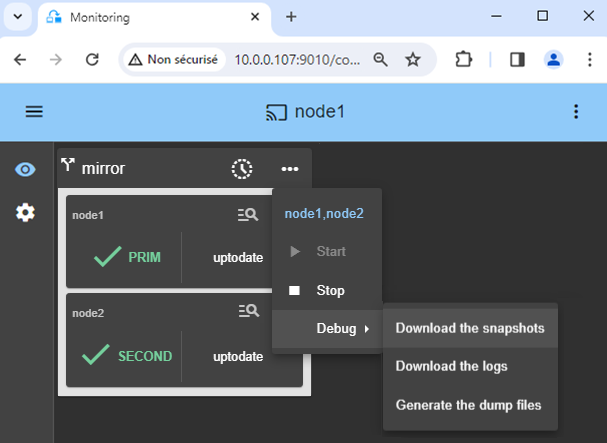
* For getting support, take 2 SafeKit `Snapshots` (2 .zip files), one for each node.

[More information on the support here](https://safekit.evidian.com/products/high-availability-software-for-application-clustering/safekit-support/).
[](/wp-content/uploads/2024/03/30-snapshots-mirror.png)
## 🔍 SafeKit High Availability Navigation Hub
Explore SafeKit: Features, technical videos, documentation, and free trial
| Resource Type | Description | Direct Link |
| --- | --- | --- |
| **Key Features** | Why Choose SafeKit for Simple and Cost-Effective High Availability? | [See Why Choose SafeKit for High Availability](https://safekit.evidian.com/products/high-availability-software-for-application-clustering/#why-choose-safekit-for-ha "Discover SafeKit features for simple and cost-effective high availability") |
| **Use Cases** | Explore How SafeKit Ensures the High Availability of Critical Infrastructure | [See All Use Cases](https://safekit.evidian.com/products/high-availability-software-for-application-clustering/#safekit-use-cases "Explore SafeKit high availability use cases") |
| **Deployment Model** | All-in-One SANless HA: Shared-Nothing Software Clustering | [See SafeKit All-in-One SANless HA](https://safekit.evidian.com/products/high-availability-software-for-application-clustering/#all-in-one-sanless-ha "Learn about all-in-one SANless high availability with shared-nothing software clustering") |
| **HA Strategies** | SafeKit: Infrastructure (VM) vs. Application-Level High Availability | [See SafeKit HA & Redundancy: VM vs. Application Level](https://safekit.evidian.com/products/high-availability-software-for-application-clustering/#safekit-ha-redundancy-choices "Compare VM-level redundancy with SafeKit application-level high availability strategies") |
| **Technical Specifications** | Technical Limitations for SafeKit Clustering | [See SafeKit High Availability Limitations](https://safekit.evidian.com/products/high-availability-software-for-application-clustering/#safekit-ha-limitations "Technical requirements and limitations for SafeKit application clustering") |
| **Proof of Concept** | SafeKit: High Availability Configuration & Failover Demos | [See SafeKit Failover Tutorials](https://safekit.evidian.com/products/high-availability-software-for-application-clustering/#safekit-failover-tutorials "Step-by-step videos on SafeKit high availability, from installation to automated failover") |
| **Architecture** | How the SafeKit Mirror Cluster works (Real-Time Replication & Failover) | [See SafeKit Mirror Cluster: Real-Time Replication & Failover](https://safekit.evidian.com/products/high-availability-software-for-application-clustering/#safekit-mirror-cluster "See technical architecture and failover mechanism of SafeKit Mirror Cluster") |
| **Architecture** | How the SafeKit Farm Cluster works (Network Load Balancing & Failover) | [See SafeKit Farm Cluster: Network Load Balancing & Failover](https://safekit.evidian.com/products/high-availability-software-for-application-clustering/#safekit-farm-cluster "Technical overview of SafeKit Farm Cluster architecture with network load balancing") |
| **Competitive Advantages** | Comparison: SafeKit vs. Traditional High Availability (HA) Clusters | [See SafeKit vs. Traditional HA Cluster Comparison](https://safekit.evidian.com/products/high-availability-software-for-application-clustering/#safekit-ha-comparison "Detailed comparison of SafeKit software vs traditional hardware-based HA clusters") |
| **Technical Resources** | SafeKit High Availability: Documentation, Downloads & Trial | [See SafeKit HA Free Trial & Technical Documentation](https://safekit.evidian.com/products/high-availability-software-for-application-clustering/#safekit-ha-technical-resources "Access SafeKit free trial, technical documentation, and high availability white papers") |
| **Pre-configured Solutions** | SafeKit Application Module Library: Ready-to-Use HA Solutions | [See SafeKit High Availability Application Modules](https://safekit.evidian.com/products/high-availability-software-for-application-clustering/#safekit-ha-application-modules "Browse the library of pre-configured SafeKit modules for automated application failover") |
[🧑 Contact us](https://safekit.evidian.com/products/high-availability-software-for-application-clustering/contact-us-for-safekit/)
[🎁 SafeKit free trial](https://safekit.evidian.com/products/high-availability-software-for-application-clustering/safekit-free-trial/)
[🏅 Free certification](https://training.my.evidian.com/mod/page/view.php?id=712)
[💰 Perpetual license cost](https://safekit.evidian.com/products/high-availability-software-for-application-clustering/get-a-quote-safekit-en/)
* © Eviden, all rights reserved
* |[Eviden privacy](https://eviden.com/privacy-policy)
* |[Eviden terms and conditions](https://eviden.com/terms-and-conditions)
* |[Eviden](https://eviden.com)
[](https://eviden.com/)
We use cookies on our website to give you the most relevant experience by remembering your preferences and repeat visits. By clicking “Accept”, you consent to the use of ALL the cookies. However you may visit Cookie Settings to provide a controlled consent.